本文简单记录OpenCV库提供的视频文件读写的一些细节
OpenCV VideoIO
Created 2020.10.10 by Cong Yu; Last modified: 2022.09.01-v1.2.0
Contact: windmillyucong@163.com
Copyleft! 2022 Cong Yu. Some rights reserved.
REFERENCES
-
opencv module VideoIO https://docs.opencv.org/4.x/dd/de7/group__videoio.html
-
opencv tutorial doc https://docs.opencv.org/4.x/de/d3d/tutorial_table_of_content_app.html
- opencv tutorial doc https://docs.opencv.org/4.x/d7/d9e/tutorial_video_write.html
-
opencv doc https://docs.opencv.org/4.x/d0/da7/videoio_overview.html
1. General Information
1.1 OpenCV VideoIO 与 后端
Basically, the module provides the cv::VideoCapture and cv::VideoWriter classes as 2-layer interface to many video I/O APIs used as backend.
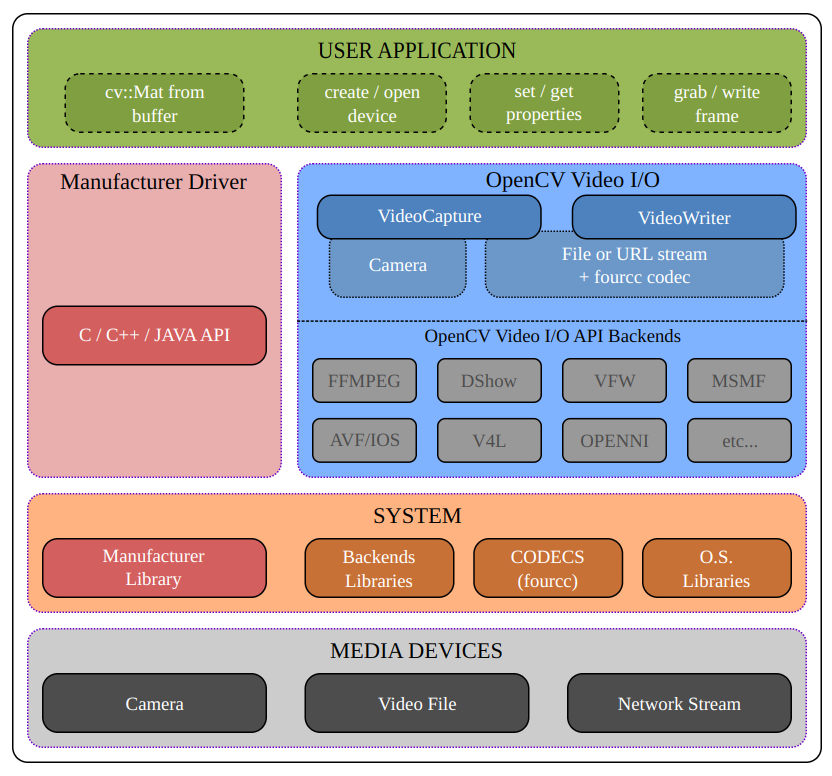
Fig1. Video IO with opencv
Some backends such as Direct Show (DSHOW), Microsoft Media Foundation (MSMF), Video 4 Linux (V4L), etc… are interfaces to the video I/O library provided by the operating system.
Some others backends like OpenNI2 for Kinect, Intel Perceptual Computing SDK, GStreamer, XIMEA Camera API, etc… are interfaces to proprietary drivers or to external library.
1.2 Video的结构
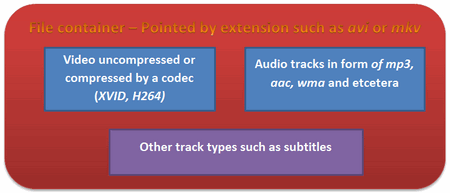
Fig2. The struct of video
- 一个视频文件包含多个元素:
- 视频提要
- 音频提要,音轨
- 其他轨道(e.g. 字幕)
- 这些元素的存储方式取决于他们所使用的编解码器
- 音轨,常用的有mp3, aac
- 视频,常用的有XVID, DIVX, H264等
2. cv::VideoWriter
2.1 VideoWriter类
1
2
3
4
5
6
cv::VideoWriter::VideoWriter	(	const String & 	filename,
int 	fourcc,
double 	fps,
Size 	frameSize,
bool 	isColor = true
)
参数:
- filename: Name of the output video file. 保存的视频文件名
- fourcc: 4-character code of codec used to compress the frames. 编码格式
- For example, VideoWriter::fourcc(‘P’,’I’,’M’,’1’) is a MPEG-1 codec, VideoWriter::fourcc(‘M’,’J’,’P’,’G’) is a motion-jpeg codec etc. List of codes can be obtained at Video Codecs by FOURCC page. FFMPEG backend with MP4 container natively uses other values as fourcc code: see ObjectType, so you may receive a warning message from OpenCV about fourcc code conversion.
- fps: Framerate of the created video stream. 帧率
- frameSize: Size of the video frames.
- isColor: If it is not zero, the encoder will expect and encode color frames, otherwise it will work with grayscale frames.
代码片段示例
1
2
3
4
5
6
7
8
9
10
11
12
13
14
15
16
17
18
19
20
21
22
23
24
25
26
27
28
29
30
31
32
33
34
35
36
37
38
39
40
41
42
43
44
45
46
47
48
49
50
51
#include <glog/logging.h>
#include <opencv2/highgui.hpp>
#include <string>

struct VideoFormat {
  int fourcc_;
  float fps_;
  std::string video_path_ = "./";
  std::string video_name_;
  cv::Size video_size_;
};

int main(int argc, char *argv[]) {
  cv::VideoCapture video_input_(0);
  if (!video_input_.isOpened()) {
    LOG(ERROR) << "error:can`t open video";
    return -1;
  }

  VideoFormat video_format;
  video_format.fps_ = 24;
  video_format.fourcc_ = CV_FOURCC('M', 'J', 'P', 'G');
  video_format.video_name_ =
      "PIM1_" + std::to_string(int(video_format.fps_)) + ".avi";
  video_format.video_size_ =
      cv::Size(video_input_.get(CV_CAP_PROP_FRAME_WIDTH),
               video_input_.get(CV_CAP_PROP_FRAME_HEIGHT));

  cv::VideoWriter video_writer(
      video_format.video_path_ + video_format.video_name_, video_format.fourcc_,
      video_format.fps_, video_format.video_size_, true);

  if (!video_writer.isOpened()) {
    LOG(ERROR) << "error:can`t open video_writer";
    return -1;
  }

  cv::Mat frame;
  while (true) {
    video_input_ >> frame;
    if (frame.empty() || cv::waitKey(30) == 'q') {
      break;
    }
    video_writer << frame;

    cv::imshow("video_frame", frame);
  }
  video_writer.release();
  return 0;
}
3. VideoCapture
构造
可以通过url,或video path,或camera id构造。
3.1 设置摄像头参数
设置相机的分辨率
1
2
3
4
5
6
7
8
capture.set(CV_CAP_PROP_FRAME_WIDTH, 1080);  //宽度
capture.set(CV_CAP_PROP_FRAME_HEIGHT, 960);  //高度
capture.set(CV_CAP_PROP_FPS, 30);            //帧率 帧/秒
capture.set(CV_CAP_PROP_BRIGHTNESS, 0.3);      //亮度 1
capture.set(CV_CAP_PROP_CONTRAST, 0.5);       //对比度 40
capture.set(CV_CAP_PROP_SATURATION, 0.5);     //饱和度 50
capture.set(CV_CAP_PROP_HUE, 0.5);            //色调 50
capture.set(CV_CAP_PROP_EXPOSURE, 0.2);       //曝光 50
不一样的相机支持不一样的参数设定,有的可以设置焦距
1
2
capture.set(CV_CAP_PROP_AUTOFOCUS, 0); // 自动对焦
capture.set(CV_CAP_PROP_FOCUS, 0.0);        // 相机焦距
3.2 获取摄像头参数
1
2
3
4
5
6
7
8
capture.get(CV_CAP_PROP_FRAME_WIDTH);   // 宽度
capture.get(CV_CAP_PROP_FRAME_HEIGHT);  // 高度
capture.get(CV_CAP_PROP_FPS);           // 帧率
capture.get(CV_CAP_PROP_BRIGHTNESS);    //亮度
capture.get(CV_CAP_PROP_CONTRAST);      // 对比度
capture.get(CV_CAP_PROP_SATURATION);    // 饱和度
capture.get(CV_CAP_PROP_HUE);           // 色调
capture.get(CV_CAP_PROP_EXPOSURE);      // 曝光
3.3 获取视频参数
1
capture.get(CV_CAP_PROP_FRAME_COUNT);//视频帧数
Q: 支持的视频格式
一个平台所安装的依赖支持哪些格式的Video呢?
Q: 视频的大小
Q1: 不同格式后缀对视频文件大小的影响
Q2: 不同编码格式对视频文件大小的影响
Q3: 不同帧率对视频文件大小的影响
conclusion
A1: 不同格式对视频文件大小的影响
mp4格式写不出来,依赖没有安装好,略过
A2: 不同编码格式对视频文件大小的影响
目前发现 MJPG > PIM1 > MP42
MJPG 25M PIM1 540K MP42 480K 这个差距比较大哦
Q3: 不同帧率对视频文件大小的影响
目前发现
MJPG 视频文件大小与帧率无关
MP42 帧率越小文件越大播放速度越慢
暂时只有这几个格式可以正常写入
帧率和速度的关系
-
帧率,速度关系
-
相同的文件格式
- .avi
-
相同的现实时间
- 帧率越高,视频总时长越短,视频速度越快
-
注:如何查看插入的 usb camera的序号
1
2
3
lsusb

v4l2-ctl --list-devices
注:多摄像头使用
- https://blog.csdn.net/waynebuaa/article/details/41786281
考虑不同传感器时间戳同步问题
放一个queue, 在queue里面处理。
注:1080p
解析度(DPI)又稱圖像的”像素”或 “圖像分辨率”,常見的解析度的規格如:
- 720P 是指解析度 1280*720 畫素, 1280 x 720 = 921600 像素,就是在攝像鏡頭規格俗稱的百萬像素,也就是 720p 或 720i。
- 960P 是指解析度 1280*960 畫素, 1280 x 960 = 1228800 像素,也就是 960p 或 960i 為 130萬像素。
- 1080P 是指解析度 1920*1080 畫素, 1920 x 1080 = 2073600 像素,也就是 1080p 或 1080i 為 200 萬像素。
最近比較成熟的 4K,指的是 3840*2160 畫素,也就是 2160p、2160i 約 360萬畫素,大家都稱為 4K。
参数i 是什么? 比如 1080i
i表示各行扫描
清晰度排名为 1080P>1080I>720P>720I
注:减小延时
提高读取帧率。把采集线程和处理线程分开。
生产消费者模式
Contact
Feel free to contact me windmillyucong@163.com anytime for anything.
License